For the first time ever I attended a Partner Connect. It was awesome hearing what is on the horizon. I can’t share everything yet, but it will be worth the wait.

Had to get my buttons and meet my co-workers from RBA.


For the first time ever I attended a Partner Connect. It was awesome hearing what is on the horizon. I can’t share everything yet, but it will be worth the wait.
Had to get my buttons and meet my co-workers from RBA.
What better way to start the day then with run?. Wednesday I am organizing a run/walk, so I needed to test out some routes.

There are some restrictions on what I can share from the MVP Summit. However, I’m gonna share what I can.
The first thing I will share is that I’m excited about what next year has in store for Sitecore and the community.
I am a big fan of the Content Hub. Based on what I have heard, it’s gonna be a bigger powerhouse next year.
As XM cloud grows so do all of the ways to implement it. It keeps getting stronger every year. Some clients are not ready to get there yet. Sitecore is at least preparing for that when they do get there. I really like the idea of a hybrid model. Some clients can move their sites over to XM cloud. They keep their other ones in XM/XP until they’re ready.
it was interesting to learn how psych’s competitors have been attacking them in the market. Sitecore is not one to attack others. Their product will speak for itself. They will take the initiative to show that more, from what I understand.
Sitecore’s e-learning will offer new courses. These courses aim to help non-technical people grow their Sitecore knowledge.
Well, after all that serious business, it was time of the party at Dave & Buster’s.


Started out with the annual food tour. This was a great time to catch up with everyone and learn more about the history of Nashville. We made some great stops and the food was great. Hot chicken did not disappoint. Looking forward to the MVP summit tomorrow.


I always feel very blessed when I get to the Sitecore Symposium. I especially enjoy it when it takes place in a city I have never been to (Nashville). Besides seeing my co-workers from RBA I get to see a lot of people from the Sitecore community. Plus there is the MVP Summit, events, cool swag, the walks/runs I am going to organize etc… Most of all there are the presentations. I love attending them and sharing what I got to see. Hopefully I will get to implement some new ideas too.

Within the last year I passed the Content Hub Admin and Developer exams. Being not so good at taking tests made things even more difficult. Even still for me I am sure there are others like me though so I wanted to give advice on how to give these exams your best shots. It is ok to fail, but not trying is even worst.
Get a Content Hub Sandbox and Start with one of the Available Demos.
Sitecore’s Demo Team has put together some impressive demos. I went through what they did and tried to understand everything. I went through the taxonomy, schemas, scripts etc… Not only did I learn new things it gave me ideas for future projects. If you learn by doing using the installed demo will get you a lot of hands on training.
Use the exam study guides.
Sitecore learning has study guides available that will go over what to expect in the test. These can be overwhelming because there is a lot of information in there. Try to get the overall idea of what is being explained so at least you can go back and remember if you need to retake the exam. Also the practice questions should be copied and memorized. They may not be on the exam, but be prepared just in case.
Create your own study guide.
I took notes on what I thought was important and TBH whenever I failed an exam I quickly jotted down questions I knew I struggled with. The exam results will also tell you what you should study more. Making you own study guide not only gives you something to refer to, but you can use it for future use when you are happily using the Content Hub.
Use multiple choice strategies.
This is always better said than done. However you have four answers to choose from. I found at least two answers didn’t make sense. So I tried to eliminate those. The last two you really need to figure out which one the answer should be. Look into the question for help, but also look at other questions that may also give you clues. At the end of the day if you can’t decide, choose the one that makes the most logical sense.
Understand how taxonomy and relationship works.
You have been exposed to this throughout your career. The content hub is no different. One thing though I want to stress is think of the taxonomy type as a parent to the asset. Not the other way around. This is important because you want to think about how different things relate to each other. For instance a taxonomy has a one to many relationship with assets. Think about other things that relate to each other and how many things would relate back and forth. Could be many to many. Also a rule of thumb is taxonomies and security go hand in hand.
Understand how workflows work.
You have been using workflows in Sitecore and in content hub they really are not that different. Get familiar with the way content hub does workflows. I promise it is not much different than how Sitecore does it.
Spend time in the setting settings in the content hub sandbox.
This is important as you will use a lot of the different tools here. Make sure you look at triggers, schemas, actions etc… You will need to understand why and where you would use them.
Learn about in process vs background process and when/not to use them.
In Process – is necessary when you need immediate feedback for the user interface.Nothing else will be executed until In Process is finished.
In Background – by default a script must be set to background processing. This makes it run behind the scenes without user interaction.
Look at the action scripts in the demo of Content Hub.
Try and understand how data is passed back and forth. See how the scripts interact with various internal an external components.
Take the Sitecore Training and Exam Prep
I highly recommend taking any Sitecore training offered. Make sure you make a connection to the instructor and give them any feedback after taking the exam. Not everything will be on the exam taught in the class, but you will be better prepared.
Breathe and Relax.
I am getting better at this. I tend to be nervous going into any test I take. I soon relax as the test goes on. I tend to get a little anxious when I don’t have a clear answer to questions. Just breathing and relaxing really does help. Just don’t breathe too loud because the microphone may pick it up and the exam could get paused. 🙂 The answer is there, just reread the question and again make the logical choice.
Conclusion
No matter what happens don’t give up trying. If you fail, learn from it and don’t be worried about taking the exam again. I always recommend taking the training and exam prep offered by Sitecore.
This is part of my back to basics series of blogs. One of the things that I have come across in different Sitecore site installs that are critical for content authors is branch templates. Branch templates have been around quite a while in Sitecore. Although Experience Editor is popular and branch templates work in Experience Editor a lot of content authors still use the Content Editor exclusively. Utilizing branch templates will make the process smoother when creating content and better guide the content authors.
So the best way to explain how branches work is to think of them as a tree. You have the trunk which would be the item you want to create, but then you have the branches that help the tree grow and help define what kind of tree it is, but most of all help feed the tree. For example a vehicle sticker. Vehicles can come with different options, different colors, etc… Each vehicle is different too and there would be options just for that vehicle and not other vehicles. Just for fun I drew a picture on my iPad to explain it visually. 🙂

Branch templates are usually created under /sitecore/templates/Branches. Right clicking on the Branches folder you will be prompted to pick a template.

After choosing a template you can add different templates underneath. In the instance below I created a branch for a vehicle sticker item. $name is the vehicle sticker template and what you see underneath is the supporting templates and template folders.


Now just set the insert options where you want the branch template and then you will get a new vehicle sticker item created with all of the supporting templates. Keep in mind all the presentation layer settings will be the same as it would be if you just inserted the vehicle sticker item.

After setting the branch template for the insert options. You will see the following after you insert the new branch template on the content tree.

So there you have it. The basics of a branch template. I believe this is one of the more critical features to implement when creating a Sitecore site. It will ensure content is created correctly from the start. Now that being said with newer versions of SXA, Page Branches were introduced. I will be covering that concept in the future. Regardless you can still choose to use branch templates.
You will probably see a lot of blogs about the new release. I wanted to highlight some of the things that pertain to clients and content authors that I know makes this release exciting and will have clients wanting to upgrade based on my experience.
One of things I know is big with our client is accessibility. Not only for a website, but for content entry as well. The content editor gets some great exciting new updates:
Example of an item that the tab stop has landed on:
Tabbing example:

Many clients are not ready to go full XM Cloud. However now you can have the best of both worlds.
There are a lot of major/minor changes with this release. To find out more and how to download the latest version of Sitecore follow this link.

Item Versions
Sometimes things are perfect just the way they are, but a lot of times thing evolve and changes are necessary. Sitecore has a way to make sure sites evolve as things change. Change can be good or bad, but thankfully with versioning you will have no regrets.
In the image below you will see the current content. The Versions ribbon is where you can create a new version of an item, select a different version, compare versions and remove versions.

A couple of reasons why you would want to use versioning:
See below for an example of adding a new version and viewing history.

Language Versions
Sitecore easily allows you to switch language for a site and gives you the tools to easily implement any language. If you wanted to do a site in Klingon you can easily do it. Similar to item versions you can have multiple language versions.
Advantages of language versions:
The language versions can be found under the Versions ribbon.

See below for an example of adding a new language version.

Hope this helps you get a little better understanding of versioning. Sitecore’s versioning is a solid part of the framework and one of the most powerful things you can use in a website.

One of the most overlooked features of Sitecore is the workflow. A good workflow implementation will ensure the correct content is published for a site. It can also bring different departments together for approval such as the marketing department and legal department. For instance marketing may come up with a campaign, but in order for it to be published would need to be approved by legal first to make sure everything is good. This is a very basic overview of a workflow meant for anyone beginning to understand how they work.
Using Lego as an example we can illustrate a workflow.

The out of the box workflows can be found at /sitecore/system/Workflows. If you look at XM Cloud you will see the following. XP/XM will look similar without the JSS Workflow.


Breaking down the workflow parts.
| Element | Description |
|---|---|
| States | This is basically where you are at in a workflow. Could be draft, waiting for legal approval etc… |
| Commands | Commands is what the person in the workflow will do in order to go to the next state. A person doing the workflow could choose approve, reject, submit etc… It all depends on how the workflow is setup. |
| Actions | Actions get executed when a command is initiated. An example would be a validation action or a publish action. |
To assign a work flow to a template you can do the following:
Make sure you can view standard values.

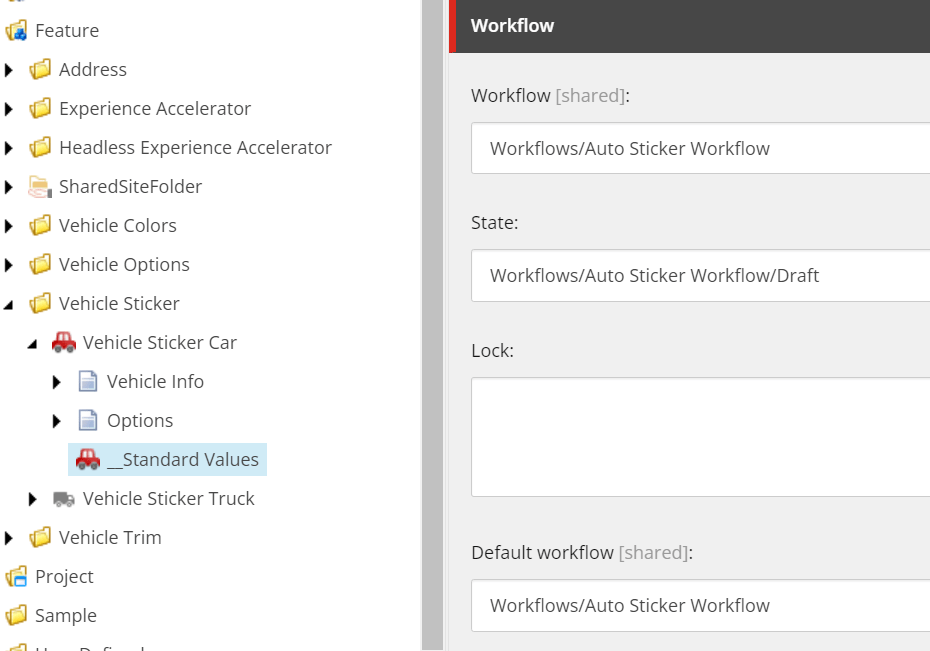
In the standard values set the workflow values or if a content item is missing a workflow you can also set it in the workflow section of the item. For example here is a workflow created for an auto sticker template.
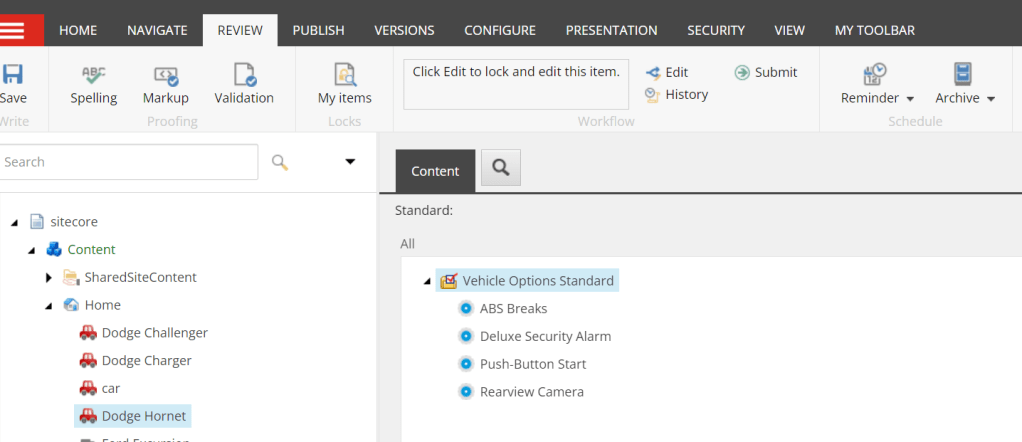
When a new item is created using the template you will see the Submit command on the menu. Once clicked will start the workflow.
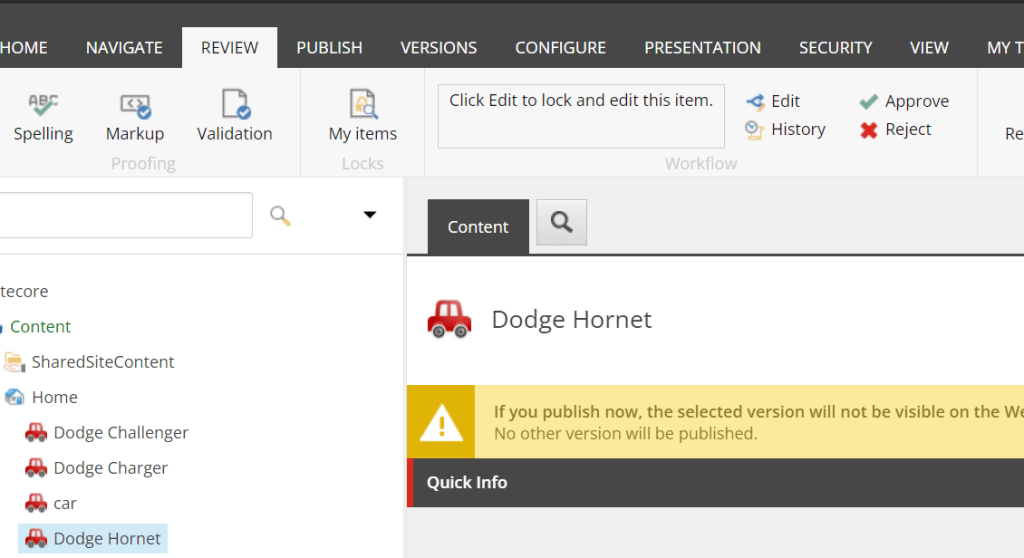
After it is submitted you will see more commands. If all the approvals are met the publish action will execute.
The workbox is a great tool to make sure you complete any workflow state/action assigned to you. You can find the workbox from the bottom tabs of the content editor or from the desktop.


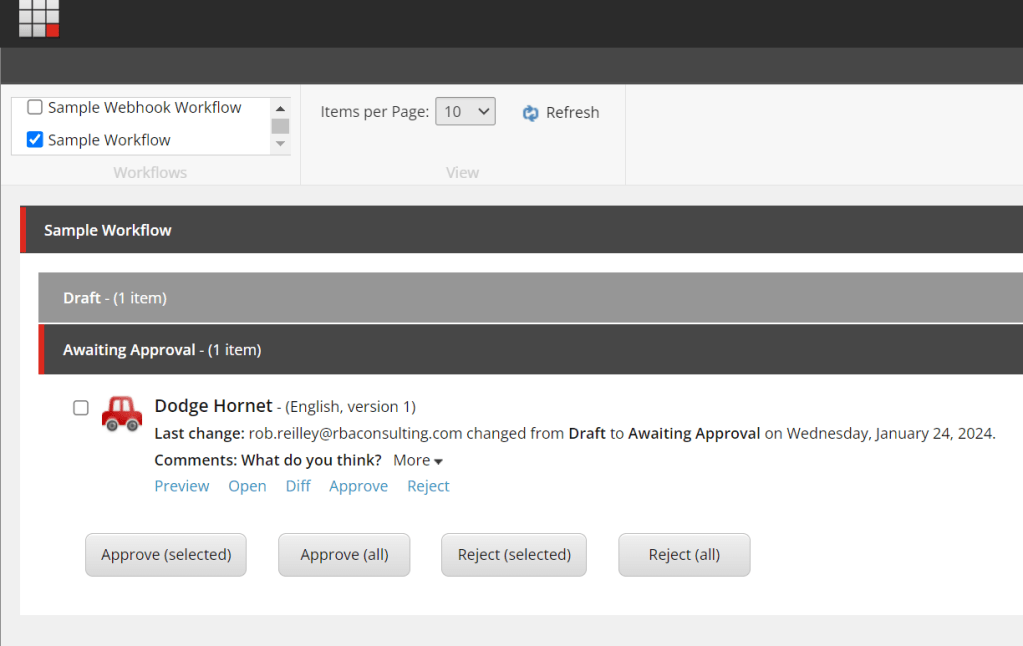
I hope this overview makes sense. More than likely a developer will create a workflow based on needs. As someone who uses them though it is ok to ask for a workflow that mirrors a real world flow.
So for me and many others it was that time of year to set your clocks back in October. This time it was Fall back. Which reminded me. I recently discovered a method that lets me turn off fallback language when I need to in code. There are certain thing I wanted language fallback on and certain things I didn’t want it on for. Sitemap/Alternative Links was something that I only wanted to show links that have language versions for. Using this switcher I only get the items that we have a version a created a language for.
using (new LanguageFallbackItemSwitcher(false))
{
     var itemChildren = Sitecore.Context.Item.Children;

     foreach (Item childItem in itemChildren)
     {
          var urlOpt = new ItemUrlBuilderOptions
          {
               LanguageEmbedding = LanguageEmbedding.Always
          };

          foreach (var lang in item.Languages)
          {
               var langItem = childItem.Database.GetItem(childItem.ID, lang);

//If the switcher is set to true you would get all language versions of an item including fallback
//In this case we just want versions that are created and not using fallback.
      if (langItem.Versions.Count <= 0)
      {
          continue;
      }

urlOptions.Language = lang;
var itemUrl = LinkManager.GetItemUrl(langItem, urlOpt);
      links.Add(new KeyValuePair<string, string>(lang.Name, SiteHelper.EnsureScheme(itemUrl)));
                    }
                }
}
Simple yet effective.

 Sitecore Runner | Rob Reilley | Sitecore MVP