Working on a somewhat perplexing issue I went down a path of what I can describe is ripping out some parts of a machine, changing them and putting them back in. In prior versions of Sitecore 10 there was a blog and stack exchange discussion on how to add the telephone link. Some things have changed since then and I did not see a blog that combined the two. So I wanted to go over on how to add the telephone link in the latest version. You can reference the stack exchange post here and Akshay’s blog here.
Core Database
Let’s start with the Core Database changes. These are pretty straightforward, but if you are like me it is hard to remember where things are located.
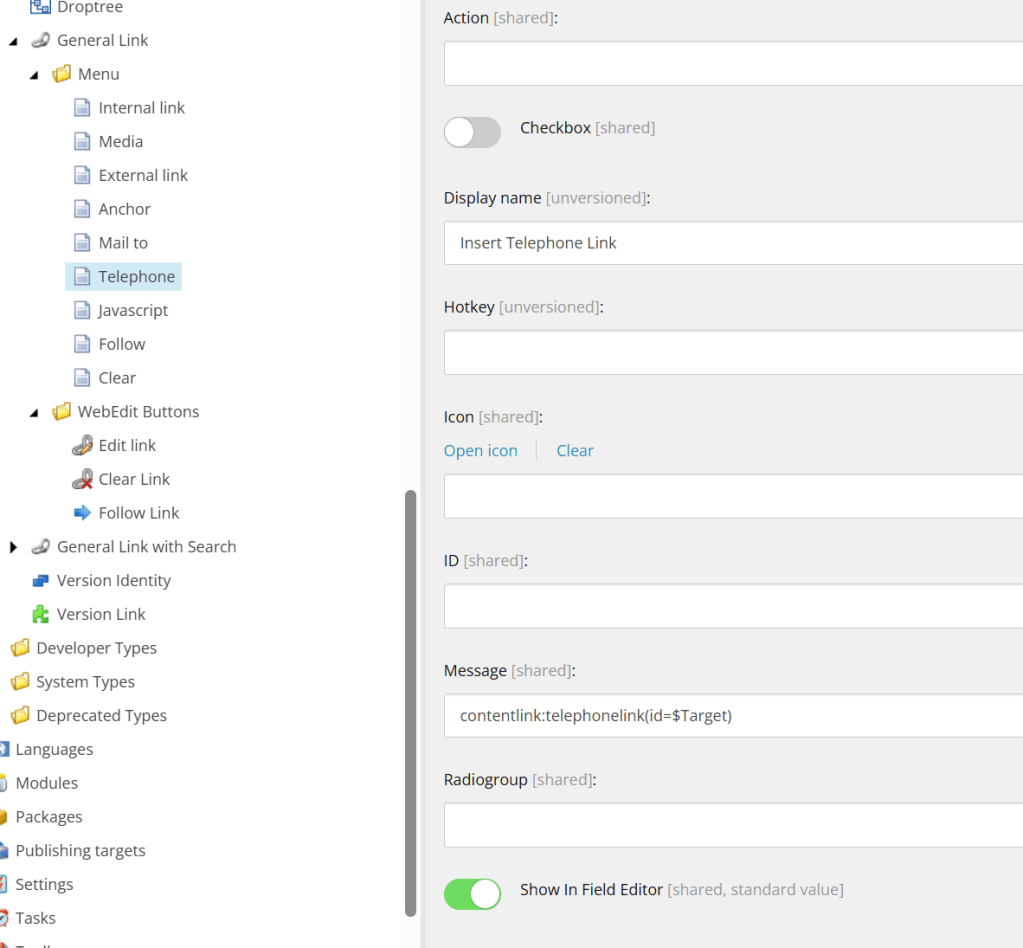
First location you want to go to is /sitecore/system/Field types/Link Types/General Link/Menu/. You will want to create a menu item using /sitecore/templates/System/Menus/Menu item as the template. I called it Telephone. This will reference the General Link for the Content Editor.
Display name: Insert Telephone Link
Message: contentlink:telephonelink(id=$Target)
Next navigate to /sitecore/system/Field types/Link Types/General Link/WebEdit Buttons/Edit link. Change the following:
Click: chrome:field:editcontrol({command:”webedit:edittelephonelink”})

You are now done with the Core database changes.
Configuration Changes
You can do configuration changes last, but if you know the names of your classes you can do them now. I used classes located Foundation.SitecorExtensions, but you can use whatever makes sense for you. The goal here is to rewire the GetLinkFieldValue class and add in the logic for the Telephone Link.
<configuration xmlns:patch="http://www.sitecore.net/xmlconfig/" xmlns:set="http://www.sitecore.net/xmlconfig/set/" xmlns:role="http://www.sitecore.net/xmlconfig/role/"> <sitecore> <pipelines> <renderField> <processor patch:before="*[@type='Sitecore.Pipelines.RenderField.GetLinkFieldValue, Sitecore.Kernel']" type="Supernatural.Foundation.SitecoreExtensions.Pipelines.RenderPhoneLink, Supernatural.Foundation.SitecoreExtensions" /> </renderField> </pipelines> <controlSources> <source mode="on" namespace="Supernatural.Foundation.SitecoreExtensions.Commands" assembly="Supernatural.Foundation.SitecoreExtensions" prefix="content" /> </controlSources> <commands> <command name="webedit:edittelephonelink" type="Supernatural.Foundation.SitecoreExtensions.Commands.TelephoneEditLink, Supernatural.Foundation.SitecoreExtensions" /> </commands> </sitecore></configuration>
If you are using Unicorn here is an example configuration.
<?xml version="1.0"?><configuration xmlns:patch="http://www.sitecore.net/xmlconfig/" xmlns:role="http://www.sitecore.net/xmlconfig/role/" xmlns:env="http://www.sitecore.net/xmlconfig/env/"> <sitecore role:require="Standalone or ContentManagement"> <unicorn> <configurations> <configuration name="Foundation.SitecoreExtensions.GeneralLink" description="GeneralLink Core Database"> <targetDataStore physicalRootPath="$(sourceFolder)\$(layer)\$(module)\serialization\GeneralLink" /> <syncConfiguration type="Unicorn.Loader.DefaultSyncConfiguration, Unicorn" singleInstance="true" updateLinkDatabase="false" updateSearchIndex="true" maxConcurrency="1" /> <predicate type="Unicorn.Predicates.SerializationPresetPredicate, Unicorn" singleInstance="true"> <!-- Core Database --> <include name="General Link" database="core" path="/sitecore/system/Field types/Link Types/General Link" /> </predicate> </configuration> </configurations> </unicorn> </sitecore></configuration>
Commands
Created a new class (found in previous blog).
using System.Collections.Specialized;using Sitecore;using Sitecore.Diagnostics;using Sitecore.Shell.Applications.ContentEditor;using Sitecore.Text;using Sitecore.Web.UI.Sheer;namespace Supernatural.Foundation.SitecoreExtensions.Commands{ public class TelephoneLink : Link { public TelephoneLink() { Class = "scContentControl"; Activation = true; } // Handles the message. public override void HandleMessage(Message message) { Assert.ArgumentNotNull(message, "message"); base.HandleMessage(message); //base handles other message requests if (message["id"] != ID) return; switch (message.Name) { case "contentlink:telephonelink": { var url = new UrlString(UIUtil.GetUri("control:TelephoneLinkForm")); Insert(url.ToString(), new NameValueCollection { { "height", "425" } }); break; } default: { return; } } } }}
The next class was OOTB, but no easy way to override it. As stated in the stack exchange post. That has not changed in Sitecore 10. You will need to get the code from Sitecore.Shell.Applications.WebEdit.Commands.EditLink. I will paste what I can below, but you will know what classes to include and what not to include. The xmlcontrol name is important as you will see later.
using Sitecore;using Sitecore.Collections;using Sitecore.Data;using Sitecore.Data.Fields;using Sitecore.Data.Items;using Sitecore.Diagnostics;using Sitecore.Globalization;using Sitecore.Shell.Applications.ContentEditor;using Sitecore.Shell.Applications.WebEdit.Commands;using Sitecore.Shell.Framework.Commands;using Sitecore.Sites;using Sitecore.Text;using Sitecore.Web;using Sitecore.Web.UI;using Sitecore.Web.UI.Sheer;using Sitecore.Web.UI.WebControls;using Sitecore.Xml.Xsl;using System;using System.Collections;using System.Net;using System.Text.RegularExpressions;namespace EH.Foundation.SitecoreExtensions.Commands{ public class TelephoneEditLink : WebEditLinkCommand { protected static void Run(ClientPipelineArgs args) { else { XmlValue value = new XmlValue(args.Parameters["fieldValue"], "link"); UrlString urlString = new UrlString(Context.Site.XmlControlPage); urlString["xmlcontrol"] = "SupernaturalGeneralLink"; } } } }
Dialogs
As with other classes we need to change I needed to include the necessary ones since not everything could be overridden. The following class changes Sitecore.Shell.Applications.Dialogs.GeneralLink.GeneralLinkForm.
using Sitecore;using Sitecore.Data;using Sitecore.Data.Items;using Sitecore.Diagnostics;using Sitecore.Globalization;using Sitecore.Links.UrlBuilders;using Sitecore.Resources.Media;using Sitecore.Shell.Applications.Dialogs;using Sitecore.Shell.Framework;using Sitecore.StringExtensions;using Sitecore.Utils;using Sitecore.Web;using Sitecore.Web.UI;using Sitecore.Web.UI.HtmlControls;using Sitecore.Web.UI.Sheer;using Sitecore.Web.UI.WebControls;using Sitecore.Xml;using System;using System.Text.RegularExpressions;// ============================================================================// SupernaturalGeneralLinkForm//// Based on Sitecore 10.2 GeneralLinkForm.//// Customizations:// - Added Telephone ("tel") link type support// - Added LinkTelephone control// - Added GetTelephone()// - Added SetTelephoneLinkAttributes()// - Added SetTelephoneLinkControls()// - Added "tel" support in OnOK()// - Added "tel" support in SetModeSpecificControls()// ============================================================================namespace Supernatural.Foundation.SitecoreExtensions.Dialogs{ public class SupernaturalGeneralLinkForm : LinkForm { protected Edit LinkTelephone; /// <summary>Gets or sets CurrentMode.</summary> /// <value>The current mode.</value> private string CurrentMode { ///see original class } [ProcessorMethod] protected void OnModeChange(string mode) { ///see original class } protected override void OnOK(object sender, EventArgs args) { ///see original class ///Added part to the Switch statement case "tel": flag = SetTelephoneLinkAttributes(packet); break; ///End ///see original class } private bool SetTelephoneLinkAttributes(Packet packet) { ///see original class ///Test if the phone number is valid. I did not use a regex as the other examples have. ///See TryNormalizeTelephone Class later in the blog if (!SitecoreHelper.Helper.TryNormalizeTelephone(LinkTelephone.Value, out telephone)) { SheerResponse.Alert("The telephone number is invalid."); return false; } ///see original class } private void SetTelephoneLinkControls() { if (LinkType == "tel" && string.IsNullOrEmpty(LinkTelephone.Value)) LinkTelephone.Value = LinkAttributes["url"].Replace("tel:", ""); ShowContainingRow(LinkTelephone); SectionHeader.Text = Translate.Text("Specify the Telephone, e.g. 800-555-1212"); } /// <summary>The set mode specific controls.</summary> /// <exception cref="T:System.ArgumentException"> /// </exception> private void SetModeSpecificControls() { ///see original class switch (this.CurrentMode) { ///Added to the Switch case "tel": SetTelephoneLinkControls(); break; ///End Add } ///see original class } /// <summary>Updates the preview.</summary> /// <param name="item">The item.</param> private void UpdateMediaPreview(Item item) { ///see original class } } }
Add a new class for the TelephoneLinkForm.
using System;using System.Text.RegularExpressions;using Sitecore;using Sitecore.Diagnostics;using Sitecore.Shell.Applications.Dialogs;using Sitecore.Web.UI.HtmlControls;using Sitecore.Web.UI.Sheer;using Sitecore.Xml;namespace Supernatural.Foundation.SitecoreExtensions.Dialogs{ public class TelephoneLinkForm : LinkForm { protected Edit Class; protected Edit Text; protected Edit Title; protected Edit Url; protected override void OnLoad(EventArgs e) { Assert.ArgumentNotNull(e, "e"); base.OnLoad(e); if (Context.ClientPage.IsEvent) { return; } var item = LinkAttributes["url"]; if (LinkType != "tel") { item = string.Empty; } Text.Value = LinkAttributes["text"]; Url.Value = item.Replace("tel:", ""); Class.Value = LinkAttributes["class"]; Title.Value = LinkAttributes["title"]; } protected override void OnOK(object sender, EventArgs args) { Assert.ArgumentNotNull(sender, "sender"); Assert.ArgumentNotNull(args, "args"); string telephone; ///More about the validation class later in the blog. if (!SitecoreHelper.Helper.TryNormalizeTelephone(Url.Value, out telephone)) { SheerResponse.Alert("The telephone number is invalid."); return; } var packet = new Packet("link"); SetAttribute(packet, "text", Text); SetAttribute(packet, "linktype", "tel"); SetAttribute(packet, "url", telephone); SetAttribute(packet, "anchor", string.Empty); SetAttribute(packet, "title", Title); SetAttribute(packet, "class", Class); SheerResponse.SetDialogValue(packet.OuterXml); base.OnOK(sender, args); } }}
Model
For the Model I already had a model for another change so I just added to that. You will see on the switch though the code for the telephone link.
using Sitecore.Data.Fields;namespace Supernatural.Foundation.SitecoreExtensions.Models{ public class LinkInfo { public string Url { get; set; } public string Text { get; set; } public string Title { get; set; } public string Anchor { get; set; } public string Target { get; set; } public LinkInfo() { } public LinkInfo(LinkField item) { switch (item.LinkType) { case "tel": Url = item.Url; break; default: Url = item.GetFriendlyUrl(); break; } Text = item.Text; Title = item.Title; Anchor = item.Anchor; Target = item.Target; } }}
Pipelines
Your pipeline override should match the definition you set up in the configuration file in a previous step.
namespace Supernatural.Foundation.SitecoreExtensions.Pipelines{ public class RenderPhoneLink { public void Process(Sitecore.Pipelines.RenderField.RenderFieldArgs args) { if (args != null && (args.FieldTypeKey == "link" || args.FieldTypeKey == "general link")) { var field = args.Item.Fields[args.FieldName]; if (field != null) { var linkField = new Sitecore.Data.Fields.LinkField(field); if (!string.IsNullOrEmpty(linkField.Url) && linkField.LinkType == "tel") { args.Parameters["href"] = linkField.Url; } } } } }}
Shell XML
There are two files that you will want to replace. I had them published to the website directory sitecore/shell/Applications/Dialogs/TelephoneLink. You will need to copy the originals to create the new ones. The CodeBeside setting is important in order to wire up your class. I included in the examples where I made changes. You should be able to add them to your own XML files.
SupernatualGeneralLink.xml
<?xml version="1.0" encoding="utf-8" ?><control xmlns:def="Definition" xmlns="http://schemas.sitecore.net/Visual-Studio-Intellisense"> <SupernaturalGeneralLink> <Stylesheet Src="/sitecore/shell/Applications/Dialogs/GeneralLink/GeneralLink.css"></Stylesheet> /sitecore/shell/Applications/Dialogs/GeneralLink/GeneralLink.js <FormDialog Icon="Network/32x32/link.png" Header="Insert a link" Text="Select the link type and specify the appropriate properties." OKButton="OK"> <CodeBeside Type="Supernatural.Foundation.SitecoreExtensions.Dialogs.SupernaturalGeneralLinkForm, Supernatural.Foundation.SitecoreExtensions" /> <GridPanel Height="100%" Width="100%" VAlign="top" Fixed="true" Columns="3"> <!--Telepehone link--> <Border ID="Telephone"> <a href="#" class="mode" onclick="javascript:return scForm.invoke('OnModeChange','tel')" onfocus="this.blur()"> <ThemedImage Class="mode-icon" Src="/~/icon/office/32x32/smartphone.png" /> <div class="mode-text"> <Literal Text="Telephone Link"/> </div> </a> </Border> <!--Center column--> <Space GridPanel.Width="8px" /> <!--Right column--> <Border Class="right-column" Height="100%" GridPanel.Width="100%" GridPanel.Height="100%"> <Literal Text="Telephone Number:" GridPanel.NoWrap="true"/> <Edit Width="100%" Class="scQuirksBoxModel" GridPanel.Row.ID="LinkTelephoneRow" ID="LinkTelephone"/> <Edit Width="100%" Class="scQuirksBoxModel" GridPanel.Row.ID="QuerystringRow" ID="Querystring"/> </GridPanel> </GridPanel> </Border> </GridPanel> <Button Header="Upload" ID="UploadMedia" def:placeholder="Buttons" Click="UploadImage"/> </FormDialog> </SupernaturalGeneralLink></control>
TelephoneLink.xml
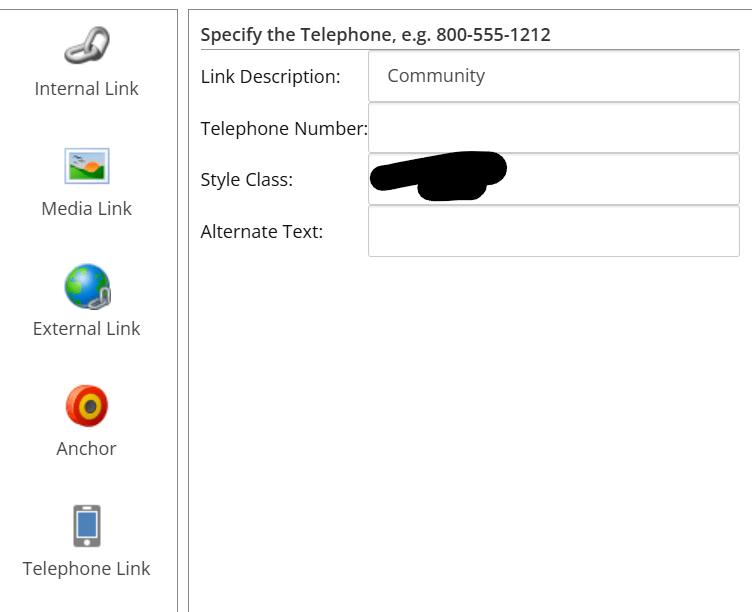
<?xml version="1.0" encoding="utf-8"?><control xmlns:def="Definition" xmlns="http://schemas.sitecore.net/Visual-Studio-Intellisense"> <TelephoneLinkForm> <FormDialog Icon="Network/32x32/mail.png" Header="Insert a telephone link" Text="Please specify the telephone number address and any additional properties. When done, click OK." OKButton="OK"> <CodeBeside Type="Supernatural.Foundation.SitecoreExtensions.Dialogs.TelephoneLinkForm,Supernatural.Foundation.SitecoreExtensions" /> <a id="telephone"></a> <GridPanel Class="scFormTable" CellPadding="2" Columns="2" Width="100%"> <Label For="Text" GridPanel.NoWrap="true"> <Literal Text="Link description:" /> </Label> <Edit ID="Text" Width="100%" GridPanel.Width="100%" /> <Label For="Url" GridPanel.NoWrap="true"> <Literal Text="Telephone Number:" /> </Label> <Edit ID="Url" Width="100%" /> <Label For="Class" GridPanel.NoWrap="true"> <Literal Text="Style class:" /> </Label> <Edit ID="Class" Width="100%" /> <Label For="Title" GridPanel.NoWrap="true"> <Literal Text="Alternate text:" /> </Label> <Edit ID="Title" Width="100%" /> </GridPanel> </FormDialog> </TelephoneLinkForm></control>
Helper
I needed a class to validate the telephone number. I know the other examples used something slightly different, but I wanted to allow the users to enter a phone number the way they normally do. If the number of digits are correct that should work. You can put this helper method anywhere you see fit in your solution.
 public static bool TryNormalizeTelephone(string value, out string telephone)
        {
            telephone = string.Empty;

            if (string.IsNullOrWhiteSpace(value))
            {
                return true;
            }

            // Remove existing tel: prefix if present
            if (value.StartsWith("tel:", StringComparison.InvariantCultureIgnoreCase))
            {
                value = value.Substring(4);
            }

            // Keep only digits
            string digits = Regex.Replace(value, @"\D", "");

            // Allow leading US country code
            if (digits.Length == 11 && digits.StartsWith("1"))
            {
                digits = digits.Substring(1);
            }

            // Must be a valid 10-digit US phone number
            if (digits.Length != 10)
            {
                return false;
            }

            telephone = $"tel:{digits}";
            return true;
        }
Final Result

Content Editor:


Experience Editor