#Sitecore Symposium 2024 Preview: Looking Forward to Learning and Networking

I always feel very blessed when I get to the Sitecore Symposium. I especially enjoy it when it takes place in a city I have never been to (Nashville). Besides seeing my co-workers from RBA I get to see a lot of people from the Sitecore community. Plus there is the MVP Summit, events, cool swag, the walks/runs I am going to organize etc… Most of all there are the presentations. I love attending them and sharing what I got to see. Hopefully I will get to implement some new ideas too.

  1. MVP Summit – Well this is a mix of presentations. What I hope to get out of it is learn what is coming out in the future. The Q&A sessions is my favorite part as I get to ask questions to various Sitecore representatives.
  2. Welcome Reception -This always gets me excited. It is a great way to kick off the Symposium and gives attendees a peak into the future of Sitecore.
  3. Rocking your website searches with AI magic and GenAI for translation. Just like everyone else I am excited about AI. I have been using AI in Content Hub lately, in programming, social media and soon hopefully in my next iPhone.
  4. A fireside chat with Katie Ledecky – I always love the insight of someone who is driven to succeed. Can’t wait to hear about her accomplishments.
  5. Disrupting the experience with generative AI – I am already using copilot. Finding out about generative AI will be great. It will add more tools to my development environment.
  6. Is AI bias the new elephant in the room? – I know based on the presenters this will be a great presentation. I know I will come out with a different perspective after this one.
  7. Sitecore Content Hub R&D roadmap and Continuous improvement with Sitecore Content Hub: From DAM to CMP and beyond – I love the Content Hub. Anything I can do to learn more about it is an opportunity I will take.
  8. Next-gen frontend development with XM Cloud – I am mainly a back-end developer, but I always want to learn more of the front-end. This presentation sounds perfect to take the next step.
  9. Driving engagement: From 0-60 in just 3 months to implement Sitecore Search and Personalize – This one sounds interesting as most clients need something yesterday to stay ahead of the curve.
  10. How to make generative AI think like your design team – This one involves combining Content Hub and AI. Sounds good to me.
  11. Drive hyper-personalized engagement in the healthcare and life sciences industries – I feel this is an important topic. Shared health data is important these days and seems to be the trend.
  12. Sitecore CDP: Unlock your data with unified tracking – Recently I have been engaging with Sitecore on this. I can’t wait to learn more.
  13. Building resilient integrations with XM Cloud – I know this presenter well. I have no doubt I will come out of this one with lots of new information.
  14. Revive, renew, reimagine: Sitecore XP renaissance – I really love XP. It may not always be the new shiny jewel, but it is extremely powerful still. Can’t wait to hear what is next as many clients still use it and are happy to continue using it.
  15. Headless SXA vs. Component Builder: The rock-off of the year – Always enjoy a good fight between to great ways to do things.
  16. A fireside chat with Brendan Hunt – Last, but not least. I am a huge Ted Lasso fan. I loved Coach Beard and also like the actor that portrays him even more being a fellow Chicagoan. I can’t wait to watch.

#Sitecore Content Hub Admin/Developer Exam Tips from a Nervous Test Taker

Within the last year I passed the Content Hub Admin and Developer exams. Being not so good at taking tests made things even more difficult. Even still for me I am sure there are others like me though so I wanted to give advice on how to give these exams your best shots. It is ok to fail, but not trying is even worst.

Get a Content Hub Sandbox and Start with one of the Available Demos.

Sitecore’s Demo Team has put together some impressive demos. I went through what they did and tried to understand everything. I went through the taxonomy, schemas, scripts etc… Not only did I learn new things it gave me ideas for future projects. If you learn by doing using the installed demo will get you a lot of hands on training.

Use the exam study guides.

Sitecore learning has study guides available that will go over what to expect in the test. These can be overwhelming because there is a lot of information in there. Try to get the overall idea of what is being explained so at least you can go back and remember if you need to retake the exam. Also the practice questions should be copied and memorized. They may not be on the exam, but be prepared just in case.

Create your own study guide.

I took notes on what I thought was important and TBH whenever I failed an exam I quickly jotted down questions I knew I struggled with. The exam results will also tell you what you should study more. Making you own study guide not only gives you something to refer to, but you can use it for future use when you are happily using the Content Hub.

Use multiple choice strategies.

This is always better said than done. However you have four answers to choose from. I found at least two answers didn’t make sense. So I tried to eliminate those. The last two you really need to figure out which one the answer should be. Look into the question for help, but also look at other questions that may also give you clues. At the end of the day if you can’t decide, choose the one that makes the most logical sense.

Understand how taxonomy and relationship works.

You have been exposed to this throughout your career. The content hub is no different. One thing though I want to stress is think of the taxonomy type as a parent to the asset. Not the other way around. This is important because you want to think about how different things relate to each other. For instance a taxonomy has a one to many relationship with assets. Think about other things that relate to each other and how many things would relate back and forth. Could be many to many. Also a rule of thumb is taxonomies and security go hand in hand.

Understand how workflows work.

You have been using workflows in Sitecore and in content hub they really are not that different. Get familiar with the way content hub does workflows. I promise it is not much different than how Sitecore does it.

Spend time in the setting settings in the content hub sandbox.

This is important as you will use a lot of the different tools here. Make sure you look at triggers, schemas, actions etc… You will need to understand why and where you would use them.

Learn about in process vs background process and when/not to use them.

In Process – is necessary when you need immediate feedback for the user interface.Nothing else will be executed until In Process is finished.

In Background – by default a script must be set to background processing. This makes it run behind the scenes without user interaction.

Look at the action scripts in the demo of Content Hub.

Try and understand how data is passed back and forth. See how the scripts interact with various internal an external components.

Take the Sitecore Training and Exam Prep

I highly recommend taking any Sitecore training offered. Make sure you make a connection to the instructor and give them any feedback after taking the exam. Not everything will be on the exam taught in the class, but you will be better prepared.

Breathe and Relax.

I am getting better at this. I tend to be nervous going into any test I take. I soon relax as the test goes on. I tend to get a little anxious when I don’t have a clear answer to questions. Just breathing and relaxing really does help. Just don’t breathe too loud because the microphone may pick it up and the exam could get paused. 🙂 The answer is there, just reread the question and again make the logical choice.

Conclusion

No matter what happens don’t give up trying. If you fail, learn from it and don’t be worried about taking the exam again. I always recommend taking the training and exam prep offered by Sitecore.

Sitecore Branch Templates: Simplifying Content Creation

This is part of my back to basics series of blogs. One of the things that I have come across in different Sitecore site installs that are critical for content authors is branch templates. Branch templates have been around quite a while in Sitecore. Although Experience Editor is popular and branch templates work in Experience Editor a lot of content authors still use the Content Editor exclusively. Utilizing branch templates will make the process smoother when creating content and better guide the content authors.

So the best way to explain how branches work is to think of them as a tree. You have the trunk which would be the item you want to create, but then you have the branches that help the tree grow and help define what kind of tree it is, but most of all help feed the tree. For example a vehicle sticker. Vehicles can come with different options, different colors, etc… Each vehicle is different too and there would be options just for that vehicle and not other vehicles. Just for fun I drew a picture on my iPad to explain it visually. 🙂

Drawn on my iPad.

Branch Templates – How to Create and Use Them

Branch templates are usually created under /sitecore/templates/Branches. Right clicking on the Branches folder you will be prompted to pick a template.

After choosing a template you can add different templates underneath. In the instance below I created a branch for a vehicle sticker item. $name is the vehicle sticker template and what you see underneath is the supporting templates and template folders.

Now just set the insert options where you want the branch template and then you will get a new vehicle sticker item created with all of the supporting templates. Keep in mind all the presentation layer settings will be the same as it would be if you just inserted the vehicle sticker item.

After setting the branch template for the insert options. You will see the following after you insert the new branch template on the content tree.

Conclusion

So there you have it. The basics of a branch template. I believe this is one of the more critical features to implement when creating a Sitecore site. It will ensure content is created correctly from the start. Now that being said with newer versions of SXA, Page Branches were introduced. I will be covering that concept in the future. Regardless you can still choose to use branch templates.

#Sitecore 10.4 is Here

You will probably see a lot of blogs about the new release. I wanted to highlight some of the things that pertain to clients and content authors that I know makes this release exciting and will have clients wanting to upgrade based on my experience.

Content Editor

One of things I know is big with our client is accessibility. Not only for a website, but for content entry as well. The content editor gets some great exciting new updates:

  • Easier expand items on the content tree.
  • Content area selecting fields is easier.
  • W3C ARIA Authoring Practices Guide, enabling users to seamlessly navigate with a keyboard through ribbons, the content tree, and various field types.
  • Able to listen to information about UI elements through assistive technology.

Example of an item that the tab stop has landed on:

Tabbing example:

SaaS Product Integration

Many clients are not ready to go full XM Cloud. However now you can have the best of both worlds.

  • A new migration tool that can be used to migrate content, media and users from an XM instance to an XM Cloud instance.
  • A new migration tool to transfer xDB to CDP. This can include contact facets for CDP, Personalize and also Sitecore Connect to external systems. Having this in place will help make the jump to a full SaaS environment when a company is read.

Miscellaneous Updates (copied from the release notes)

  • Added audit logging for Sitecore logins via Identity Server.
  • Added audit logging when unlocking an item in the Content Editor Review tab – My Items.
  • Added a new module called Codeless Schema Extension, enabling business users to extend the xConnect schema without requiring code development.
  • You can now target specific audiences more effectively by adding custom languages, combining any ISO language code with a country/region code. This includes the ability to use nonstandard country/region codes, such en-EU.
  • Added the ability to create a custom or regional language directly in the Content Editor, such as en-EU, which extends beyond those ISO language formats that are registered in .NET.

More Information

There are a lot of major/minor changes with this release. To find out more and how to download the latest version of Sitecore follow this link.

Back to Basics of #Sitecore Versioning and Languages. The Shape Shifting of Content.

Item Versions

Sometimes things are perfect just the way they are, but a lot of times thing evolve and changes are necessary. Sitecore has a way to make sure sites evolve as things change. Change can be good or bad, but thankfully with versioning you will have no regrets.

In the image below you will see the current content. The Versions ribbon is where you can create a new version of an item, select a different version, compare versions and remove versions.

A couple of reasons why you would want to use versioning:

  • Rollback Published Items (Sometimes for whatever reason you may need to go back the previous version of a page.)
  • Compare Versions – (Someone auditing the content can see what changed between versions.)
  • Keep a history of versions – (Keeping a history of version changes.)

See below for an example of adding a new version and viewing history.

Language Versions

Sitecore easily allows you to switch language for a site and gives you the tools to easily implement any language. If you wanted to do a site in Klingon you can easily do it. Similar to item versions you can have multiple language versions.

Advantages of language versions:

  • Multiple languages of the same page.
  • Interpreting the same content of an item in multiple languages.

The language versions can be found under the Versions ribbon.

See below for an example of adding a new language version.

Hope this helps you get a little better understanding of versioning. Sitecore’s versioning is a solid part of the framework and one of the most powerful things you can use in a website.

#Sitecore Workflows Back to Basics

One of the most overlooked features of Sitecore is the workflow. A good workflow implementation will ensure the correct content is published for a site. It can also bring different departments together for approval such as the marketing department and legal department. For instance marketing may come up with a campaign, but in order for it to be published would need to be approved by legal first to make sure everything is good. This is a very basic overview of a workflow meant for anyone beginning to understand how they work.

Workflow Basics

Using Lego as an example we can illustrate a workflow.

The out of the box workflows can be found at /sitecore/system/Workflows. If you look at XM Cloud you will see the following. XP/XM will look similar without the JSS Workflow.

Expanded view of the workflows above.

Breaking down the workflow parts.

ElementDescription
StatesThis is basically where you are at in a workflow. Could be draft, waiting for legal approval etc…
CommandsCommands is what the person in the workflow will do in order to go to the next state. A person doing the workflow could choose approve, reject, submit etc… It all depends on how the workflow is setup.
ActionsActions get executed when a command is initiated. An example would be a validation action or a publish action.

To assign a work flow to a template you can do the following:

Make sure you can view standard values.

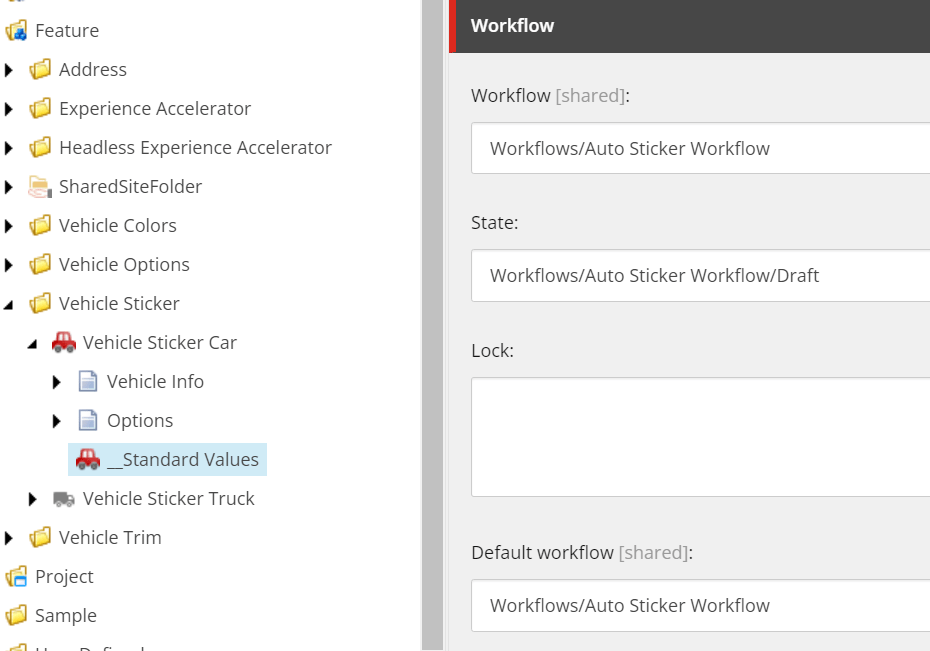
In the standard values set the workflow values or if a content item is missing a workflow you can also set it in the workflow section of the item. For example here is a workflow created for an auto sticker template.

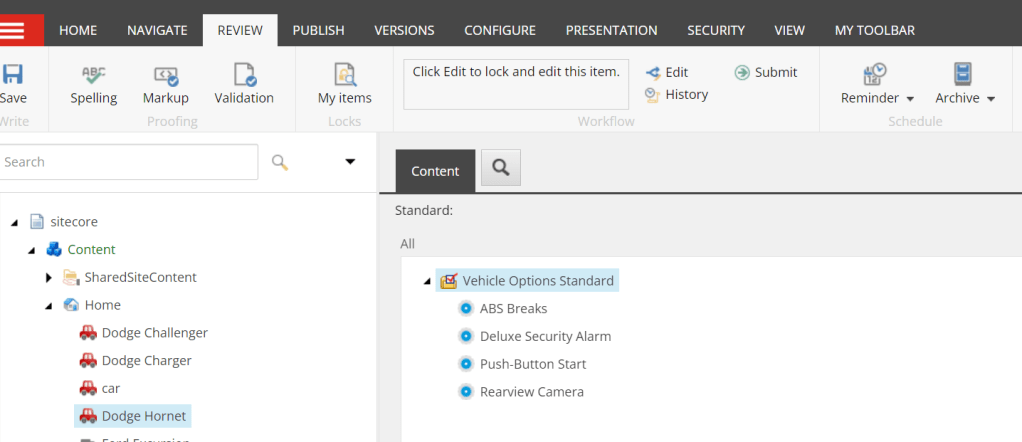
When a new item is created using the template you will see the Submit command on the menu. Once clicked will start the workflow.

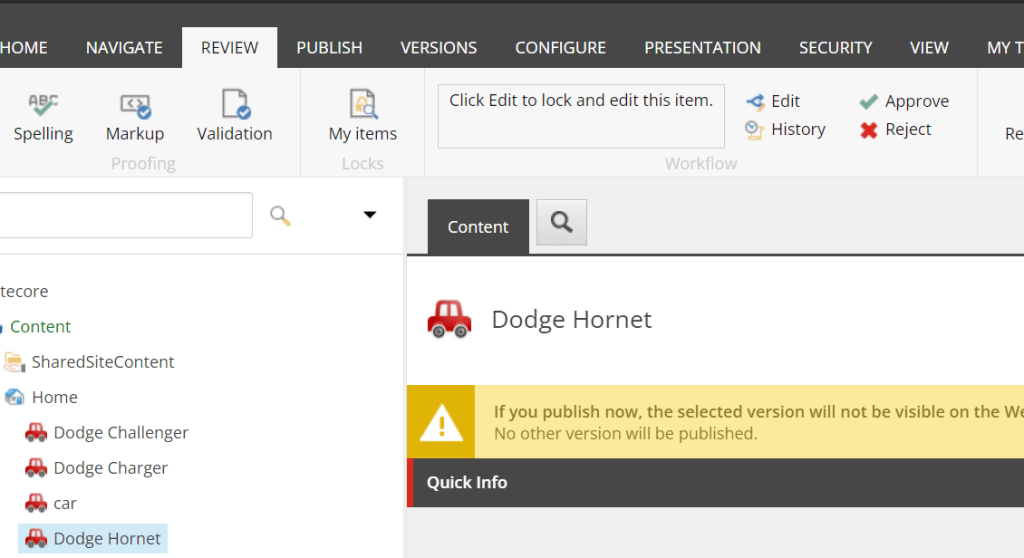
After it is submitted you will see more commands. If all the approvals are met the publish action will execute.

Workbox

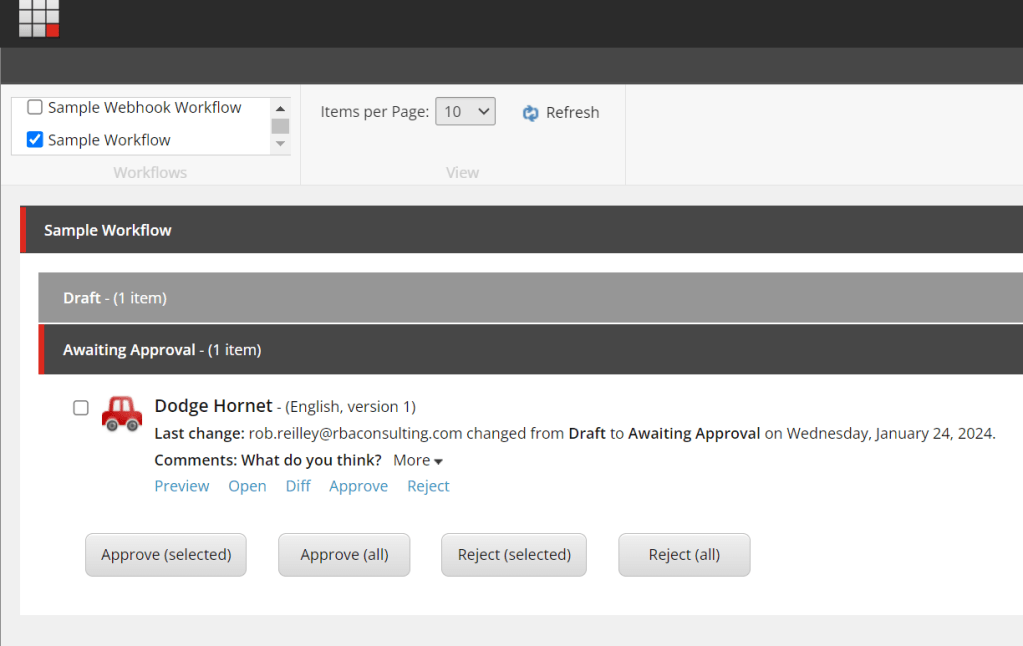
The workbox is a great tool to make sure you complete any workflow state/action assigned to you. You can find the workbox from the bottom tabs of the content editor or from the desktop.

I hope this overview makes sense. More than likely a developer will create a workflow based on needs. As someone who uses them though it is ok to ask for a workflow that mirrors a real world flow.

#Sitecore’s Fallback Language Switcher

So for me and many others it was that time of year to set your clocks back in October. This time it was Fall back. Which reminded me. I recently discovered a method that lets me turn off fallback language when I need to in code. There are certain thing I wanted language fallback on and certain things I didn’t want it on for. Sitemap/Alternative Links was something that I only wanted to show links that have language versions for. Using this switcher I only get the items that we have a version a created a language for.

using (new LanguageFallbackItemSwitcher(false))
{
     var itemChildren = Sitecore.Context.Item.Children;

     foreach (Item childItem in itemChildren)
     {
          var urlOpt = new ItemUrlBuilderOptions
          {
               LanguageEmbedding = LanguageEmbedding.Always
          };

          foreach (var lang in item.Languages)
          {
               var langItem = childItem.Database.GetItem(childItem.ID, lang);

//If the switcher is set to true you would get all language versions of an item including fallback
//In this case we just want versions that are created and not using fallback.
      if (langItem.Versions.Count <= 0)
      {
          continue;
      }

urlOptions.Language = lang;
var itemUrl = LinkManager.GetItemUrl(langItem, urlOpt);
      links.Add(new KeyValuePair<string, string>(lang.Name, SiteHelper.EnsureScheme(itemUrl)));
                    }
                }
}

Simple yet effective.

Chicago #Sitecore User Group Meetup Fall 2023

I attended the Chicago Sitecore user group last week at AmericanEagle.com and it did not disappoint. Here is the summary in pictures and captions.

First presentation was “Sitecore XM Cloud – Experiences and Learnings” (Jared Arnofsky – Americaneagle.com)”

Enjoyed this one a lot because it really helped me understand what is involved going to XM Cloud. Learned about static site pages. Looking forward to all the things I will encounter when moving to XM Cloud and this was a great heads up. Or should I say headless up?

Overview
I liked their approach on how the front-end and back-end were split up. In this image above you see how the Front-end was done.
The multi site plugin created by Sitecore was a welcomed addition to their project.

Next up was “Content Hub: Seamless Connection to your CMS” (Maggie Burke & Casey Stanutz – Americaneagle.com)

I am already familiar with Content Hub, but this was a great insight into what others have been doing with it. I came away with some new ideas.

Based on what they encountered with their client it looks these are common issues with a lot of clients.
Sitecore connector I have found to be one of the easiest things you can integrate with Content Hub.
Did not know about Renditions. Can see using them in the future.

Last but not least. “Vercel: Your Gateway to Headless Framework” (James Gregory – Americaneagle.com, Alex Hawley – Vercel)

Great insight on how we are going to be deploying all the pieces in XM Cloud. With Vercel’s help it sounds like a smooth process.

I found SSG (Static Site Regeneration) vs ISR (Incremental Site regeneration) very informative. Find more about them here.
Great tips.

Well that is a wrap. Had a lot of fun with a great group of people. Can’t wait for the next one. You can find the meetup info here.

#Sitecore MVP Summit and #SUGCONNA – Adventures of Juicy Lucy’s, You Betchas and a Bright Future

It has been well over a week since the 2023 MVP Summit/DX/SUGCONNA has wrapped up and now it is time to give my take on it. First though I want to thank everyone involved organizing the events. What an amazing job they did.

Arriving at the Radisson Blu

MVP Summit

The MVP Summit started out awesome as usual. I can only share what is public now, but excited about what is to come. Some of the highlights below.

XM Cloud+ was announced. This will give clients an all in one solutions with the most popular composable products. Will also get developers up and running fast so they can get coding. You can find more information about them here.

Tracking visitors will now be much improved. All the different products will now be able to identify and track the same visitors across each platform.

Integration of Sitecore Search and OrderCloud are now much easier to implement in XM Cloud.

More configurable Sitemaps? Sign me up. It has been a struggle to get the sitemap the way we require it in XP. Looks like that has been addressed in XM Cloud.

Sitecore has not forgotten about their classic systems. New tools were introduced to help make the jump from a legacy system to a new system.

I shared what I can for now from the MVP Summit. I am really excited about what is to come though. Can’t wait to share it with others when the time comes.

SUGCONNA (Sitecore User Group Conference North America)

Still processing how great SUGCON was. The organizers did an excellent job. I was so honored to be able to speak. This was an experience I won’t forgot. Here are the highlights.

This was one of my favorite presentations. Raiders of the New Tech Stack of course had an Indiana Jones theme. Their journey of transforming a legacy Sitecore installation and upgrading it to the latest and greatest was adventurous to say the least. Like their migration tool idea to move xDB data over. Sitecore I believe has a tool now for it.

Love this slide that was part of the presentation. Looks like everything old to new is represented.

Thought this was some great advice of anyone just starting any adventure.

Saw a lot of hexagons during the week. The really gives a menu of offerings and brings the whole ecosystem together.

Perficient’s strategist did a great presentation on how they have been able to leverage the Content Hub. Lots of whys answered. I recommend watching the presentation.

Fun Times

Have to start with my co-workers. It was great seeing them. Last year they flew to Chicago so only fitting I fly to Minneapolis/Bloomington.

Had my first Juicy Lucy at the 5/8s Club.

Spent the whole week inside the Mall of America. I may have to come out here to watch Bears game. So far their only win was the Thursday of that week. I thought I would get a lot of trash talk from Vikings and Bears fans, but nothing. However a Lions fan gave me a hard time. Wasn’t expecting that.

Was honored to get my MVP award and got some cool swag for being a speaker.

Getting ready to present. A moment I won’t forget.

Final Thoughts

I like the direction that Sitecore is heading. They have really improved their products from a year ago. I also like how they are strengthening their connections with their partners. There is a lot for me to learn, but the future is bright. Can’t wait for Nashville next year. So with those thoughts.

#Sitecore Presentation Layer Back to Basics

As with the previous template basic blog, this blog is for anyone who needs a less technical approach to the presentation layer of Sitecore. This will be good for marketers, project managers, strategists etc… who don’t need to have a deep technical understanding, but at the very least will want knowledge of what makes Sitecore tick.

One of my favorite features of Sitecore is the presentation layer. To put things in easy terms it is like using Legos to build different things. As with Legos you can build something until it meets your requirements. You can always tweak things when needed, shuffle things around and swap pieces.

Presentation Layer

So what exactly is the presentation layer. If you notice when clicking on any content item in the content tree or editing a item in the Experience Editor if you choose presentation and details you will see a listing of different renderings. Think of each rendering as a Lego section. To access the presentation details click on the presentation tab on the top ribbon and select details.

You will see something like this.

Each of the things (renderings) you see in the presentation list represent some kind of code block that will typically contain some kind of HTML and maybe some business logic. The end result is a web page. The top one (called the main layout) in this example is the MVC Layout. The MVC Layout is kind of like your Lego flat base.

The renderings (see next section) will be what will be built on the Lego base. You can lay things out any way you need to until you are satisfied what you built.

Renderings

The renderings (Lego builds) that you see are usually defined in /sitecore/layout/renderings. You will typically see various folders. We won’t get into the code too much, but when clicking on a rendering definition you will see the following. The way they are defined such as a view vs controller rendering define how it is coded in the back-end, but as a non-developer and purpose of this blog we won’t get too much into that. Just keep in mind renderings usually have accessible code that can be changed.

SXA vs Traditional

When using a non-SXA vs SXA Sitecore site thee concept is the same, but wanted to point out some things. SXA provides renderings out of the box. It is designed to get a site up and running quicker because it will have renderings already built. It also allows developers to extend SXA renderings. When testing or looking at a web page in SXA you may see a mix of out of the box renderings and custom renderings. Typically the SXA renderings can be found in an Experience Accelerator folder.

Closing

I hope this gives you a high level understanding on the presentation layer. You may not be someone who may ever need to change it when looking at something in Sitecore, but it is important to understand it. Let me know if you have any questions.